Vulnerability research
Telegram: how a link could make your desktop send a file
An external link could invoke Telegram Desktop's old file sender and, under specific conditions, exfiltrate local files including saved session material; updating to the current stable 7.3.1 closes that entry point, while exposed logins also need to be terminated in Devices.

In this article
A messaging app receives and sends files for us every day. Normally, we choose the file and the recipient. This Telegram Desktop vulnerability handed both choices to an external link: the app read a local text file, followed the path written inside it, and sent the selected file using the account already logged in. It asked for no further confirmation before sending.
BeakSec published the chain on October 3; it entered the CVE record on October 7 as CVE-2026-107181. The public demonstration used Telegram Desktop 6.9.3 on Windows, and the complete path remained in 7.2.8 source. Version 7.2.9 introduced the fix. The particularly consequential target was the app's own saved authorization: with enough of those files and the ability to decrypt local storage, an attacker could attempt to reuse an existing login.
If an old Telegram Desktop is still running on your computer, exit it and update. At publication, the latest official stable release is 7.3.1, published on GitHub on October 10. Version 7.2.9 marks the historical repair boundary; a current installation should use the latest stable release. The mobile and web clients do not use the desktop code traced here, so this CVE does not establish the same vulnerability in those clients.
1 A clicked link starts a second process
Start with an ordinary operation. A browser encounters a tg:// link and asks the operating system to open it with Telegram Desktop. Even with Telegram already open, the system may launch another process. The new process detects the existing instance, hands it the link, and exits. The original chat window stays where it was, making the handoff easy to miss.
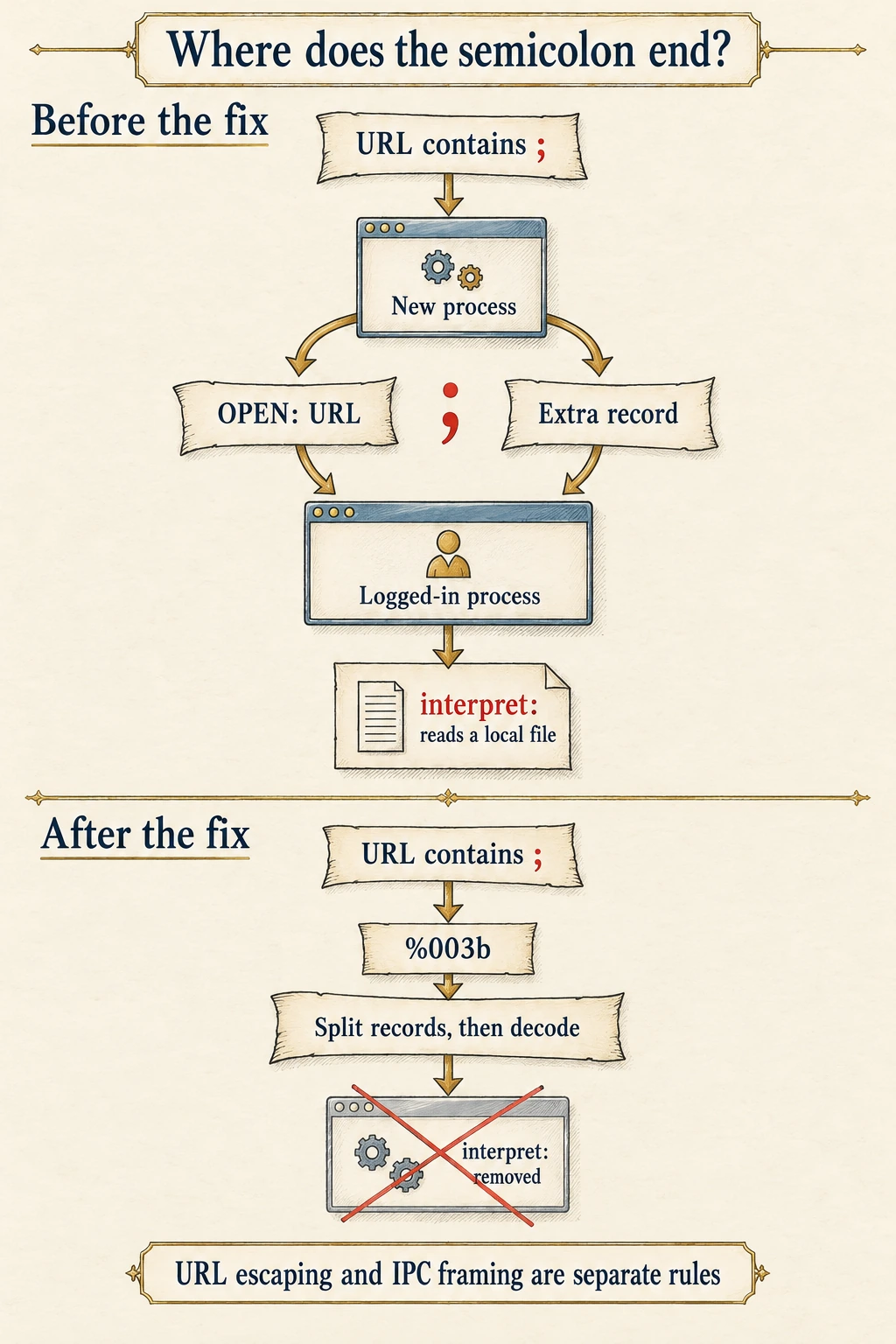
The two processes communicate through a local socket, a form of inter-process communication, or IPC. In 7.2.8's Sandbox::socketConnected(), the new process builds a text record by adding OPEN: before the URL and a semicolon after it. The running instance's readClients() treats each semicolon as the end of a record and begins processing the next one.
// 7.2.8: writing a URL into an IPC record
commands += u"OPEN:"_q + url.toString(QUrl::FullyEncoded) + ';';
The URL itself can contain a semicolon. QUrl::FullyEncoded governs the URL representation, where semicolons can remain valid characters. The surrounding, application-specific message format gives that character a second meaning: end this record. At the receiving process, part of a single link consequently becomes a new record. If that part resembles an operation the receiver recognizes, it will be processed as one.
A harmless example makes the mismatch visible. The old format splits tag=blue into a second record; that example record cannot send a file. We checked the split and the repaired round trip in an offline framing model, without launching Telegram or connecting to its services.
URL: tg://resolve?domain=demo;tag=blue

Old wire: OPEN:tg://resolve?domain=demo;tag=blue;
Records:  OPEN:tg://resolve?domain=demo
          tag=blue
This determines where the link must be opened. Clicking a tg:// link directly inside the chat normally stays within the current process, bypassing the affected socket path. The published chain takes an ordinary web link into an external browser, then redirects to tg:// so the operating system launches the additional process. The browser may ask permission to open Telegram; the prompt depends on the browser and previously granted permissions. The user must click, and may also have to approve launching the app. Merely receiving a message does not complete this chain.
2 An old publishing helper receives the extra record
Splitting a record only gives the program another input to process. File exfiltration also needs an operation that can send a file on the user's behalf. Telegram Desktop retained exactly such an entry point, interpret:. It took the path to a local text file, read its fields, and used them to send another file.
The feature had a specific historical purpose. Its 2018 introduction also added update-publishing scripts that used it to post release material automatically. Years later, the entry point remained in the ordinary client. Application::checkStartUrls() recognized the interpret scheme and passed the path to the window; MainWidget::handleStartFiles() then called Support::InterpretSendPath() directly.
That helper recognized a destination channel or supergroup, an optional topic, a file path, and a caption. It also supported from: to check the current account, but the field was optional. Leaving it out skipped the account check. Instructions delivered from outside could therefore become a publishing job executed by the current session.
The actual send occurs near the end of the function: it prepares a media list, takes the current session's API, and calls sendFiles(). The same window opens a recipient chooser for ordinary local files. This helper path has no equivalent send confirmation. An instruction file can consequently choose an existing file to read and an available destination to receive it.
Telegram's operating-system file permissions still define what it can read. A target must be readable by the process, locatable by path, and usable as a file upload. Although the socket also accepts operations named CMD:, its execExternal() dispatch handles application actions such as showing the window and quitting. Calling this arbitrary operating-system command execution would misdescribe the dangerous capability already present: a logged-in program that can read and upload files carrying out an externally supplied send.
3 The instruction file must reach disk first
interpret: reads a local path. The attacker still needs to place the instruction file on the computer and know where the app can find it. The public demonstration used text attachments in a group: opening the group allowed small files to download under the client's automatic-download settings, before the user clicked the web link posted there. The attachment was never executed as a program; the old helper read its text as publishing instructions.
Actual settings constrain that delivery step. The 7.2.8 defaults allow ordinary files up to 8 MiB to download automatically from private chats and groups, while the default limit for ordinary channel files is zero. User changes and per-chat overrides can alter that behavior. DocumentMedia::automaticLoad() also checks whether saving requires a path prompt. When it does, an ordinary file cannot simply download automatically.
The destination has a condition of its own. The helper looks it up with historyLoaded(toId) and returns an error if it cannot find it; an arbitrary unfamiliar identifier cannot create a destination chat. The published method therefore needs the user to have loaded the attacker-controlled supergroup. Restricting who can add you to groups and disabling automatic file downloads in unfamiliar groups weaken that delivery method. Manually downloading the file or entering a suitable destination can satisfy those conditions again.
The window's lock state and directory layout also matter. checkStartUrls() only handles these local-file operations while the active window is unlocked; a locked window does not immediately reach the helper. The public reproduction also relies on the relationship between the working directory and download directory in its tested Windows installation. Portable installations, custom working directories, and other operating systems require their own path analysis. These conditions explain why the link cannot succeed unconditionally on every machine, and identify the settings maintainers should actually inspect.
4 Encrypted files can still carry a reusable login
File exfiltration is already serious. The research then targeted Telegram's own tdata, which retains authorization so the next launch can continue the session. Its saved authorization keys let the client connect to servers using an existing login, making them considerably more valuable than an ordinary attachment.
The files are encrypted on disk. The important question is where the material needed to decrypt them is kept. Storage::Domain generates a random local key to protect account data. It derives another key from the local passcode and a salt, then uses that key to wrap the random key. key_datas stores the salt and wrapped local key for the next launch.
With no local passcode configured, the passcode input to derivation is empty. CreateLocalKey() uses one PBKDF2-HMAC-SHA512 iteration for an empty passcode and a higher iteration count for a nonempty one. A salt can be public, and an empty passcode contains no secret. Obtaining the file that stores this material provides the ingredients to derive the wrapping key again and unwrap the random local key.
The authorization file supplies the next step. writeMtpData()/readMtpData() write and read serialized MTProto authorization under the local key. The serialized data includes the user, main data center, and authorization-key lists. During restoration, setMtpAuthorization() and startMtp() pass the recovered keys to the connection instance. The researcher demonstrated a copied Windows session using exfiltrated key material, authorization and index files. SOSEC reviewed this storage and restoration path; we did not rerun an account-takeover experiment.
A strong local passcode changes that step: someone holding the encrypted files must also overcome the passcode protection, with difficulty depending on its strength. An unlocked vulnerable client can still send other readable files, so the passcode cannot replace an update. The account's Two-Step Verification password protects login authentication; the local passcode protects storage on this computer. They operate at different points. When existing session material leaks, the authorization itself needs attention.
5 The patch repairs framing and removes the sender
The September 16 repair commit changes both the message format and the feature entry point. The sender adds IPC-specific escaping: a semicolon becomes %003b, a percent sign becomes %0025, and control and non-ASCII characters also use four hexadecimal digits. Text that literally contains %003b has its percent sign escaped first, preventing accidental conversion into a semicolon.
The same URL in the repaired IPC format:
OPEN:tg://resolve?domain=demo%003btag=blue;

Receive: split on ; to obtain a complete record
         then decode %003b inside its content to ;
Splitting records before restoring characters preserves the link as one item. Reversing that order would bring the dangerous semicolon back into the splitting stage. The 7.2.9 escaping functions and receiver follow this order. Our offline model also checked round trips for ordinary text, literal percent sequences, Chinese characters, a newline and a surrogate-pair character. It tests the framing relationship only.
The receiver also restricts mixed operations. If the records parsed in the current batch contain OPEN:, it skips CMD: and CTRL:. Once an external URL appears on a connection, local file paths on that connection are dropped. These checks have different lifetimes: the former covers the current batch, while the latter persists as connection state. The 7.3.1 source retains these protections and adds connection-liveness handling for nested event loops.
The patch deletes interpret: from application dispatch, the window call site, and the helper implementation. Repairing framing stops this external link from creating extra records; removing the legacy publisher also withdraws its unconfirmed file-send capability from the ordinary client. I consider that an important part of the fix. Internal automation connected to everyday link handling had acquired authority far beyond what a user would expect from opening a link. Removing that connection is more dependable than relying on an unwritten convention about who may use it.
6 Updating the app leaves leaked sessions to deal with
Check the version actually running, exit every old instance, and launch the current official stable release. Inspect portable copies and frequently used shortcuts: updating one installation can leave another old copy in use. Normal startup, opening your own chats, and manually selecting a nonsensitive file with an explicit recipient are useful basic checks after updating. Do not test the patch by opening an unfamiliar link.
Linux distribution packages need their own maintenance record. At publication, Ubuntu's entry labels the packages in 22.04, 20.04 and 18.04 Needs evaluation, and labels 24.04 and 26.04 Not in release. Those labels supply no fixed package that can establish a backport. Users of distribution packages need the corresponding maintainer's repair record. When switching to an official installation channel, handle duplicate installations first so two clients do not get mixed up. If updating fails, exit the old client temporarily and use another updated official client; a desktop rollback should also retain this repair.
If a suspicious redirect was followed by files you did not send, or an unfamiliar entry in Devices, updating closes the entry point but cannot retrieve what has already left. From a trusted device, open Settings → Devices and terminate suspicious authorizations. If they cannot be distinguished confidently, terminate other sessions and sign in again on the devices you intend to keep. Telegram's stolen-device guidance likewise requires ending the old session. Rotate API keys or other secrets according to the files exposed. Deleting the downloaded instruction file cannot invalidate an authorization that has already been copied.
This bug brings an easily overlooked fact into view: a messaging app already has permission to read files, connect to the network, and send as you. The failure occurred when external-link handling lost track of which characters belonged to the link, then handed the remaining input to an old automation feature. The patch preserves the link's boundaries and removes unconfirmed sending. With signs of prior exposure, the user must also end the potentially copied login. That addresses both the program defect and the authorization left behind.