Vulnerability research
How Calc can load a remote program when opening a sheet
Two JDBC vulnerabilities let affected older LibreOffice and OpenOffice Calc installations with Java and JDBC available load a document-selected driver, potentially executing remote code on the computer opening the sheet. LibreOffice can now be updated to 26.8.1, while OpenOffice's stable 4.1.16 remains affected and needs Java integration disabled.
In this article
A spreadsheet that saves an external database connection and enables automatic refresh can retrieve new data when it opens again. That convenience has a prerequisite. The computer opening the sheet must first load a driver capable of talking to the database. A driver is executable code.
On October 2, Apache disclosed OpenOffice's CVE-2026-59265. LibreOffice disclosed CVE-2026-63277 on October 5. Affected Calc versions let a document name a Java database driver and its remote location. Loading external data could bring code from that location into the office process. V12's published demonstrations begin with opening the document and require no acceptance of a macro-execution prompt.
The products currently need different responses. LibreOffice has a stable repair, with 26.8.1 on its current download page. OpenOffice's stable download is still the affected 4.1.16, and its advisory describes 4.1.17 as a release candidate. Apache recommends disabling Java integration in the meantime.
1 A sheet saves instructions for the next connection
An external database usually stays outside the cells. The spreadsheet stores connection settings and retrieves data when opened or refreshed. V12's LibreOffice report and OpenOffice report both use database-range settings saved with the sheet. The user opens an ODS spreadsheet, which can reference a separate ODB document containing database connection settings. Inside the sheet, table:database-range identifies the area receiving data and table:refresh-delay stores the refresh interval.
In vulnerable LibreOffice 26.2.4.2, xmldrani.cxx, lines 258–368, restores the XML data source and SQL import settings into an internal object. It registers timed refresh handling for an import that needs refreshing and is not selection-based. RefreshDBDataHdl() subsequently reaches DoImport(). That function creates a RowSet, an object that runs the query and holds its result. The program sets the data-source name, command and command type before executing the connection and query.
A “data-source name” can also be an address. ORowSet::calcConnection() passes it to the database context's getByName(). When it cannot find a registered data source, getByName(), lines 597–649, treats the name as a URL and loads the database document there. Opening one ODS spreadsheet can therefore lead to loading an external ODB.
An ODB can store more than a database address. It can carry a JDBC driver's class name and class path. JDBC is the interface Java programs use to connect to databases, with a driver supplying the implementation. Naming the driver class and path gives the document control over which program the office application loads next.
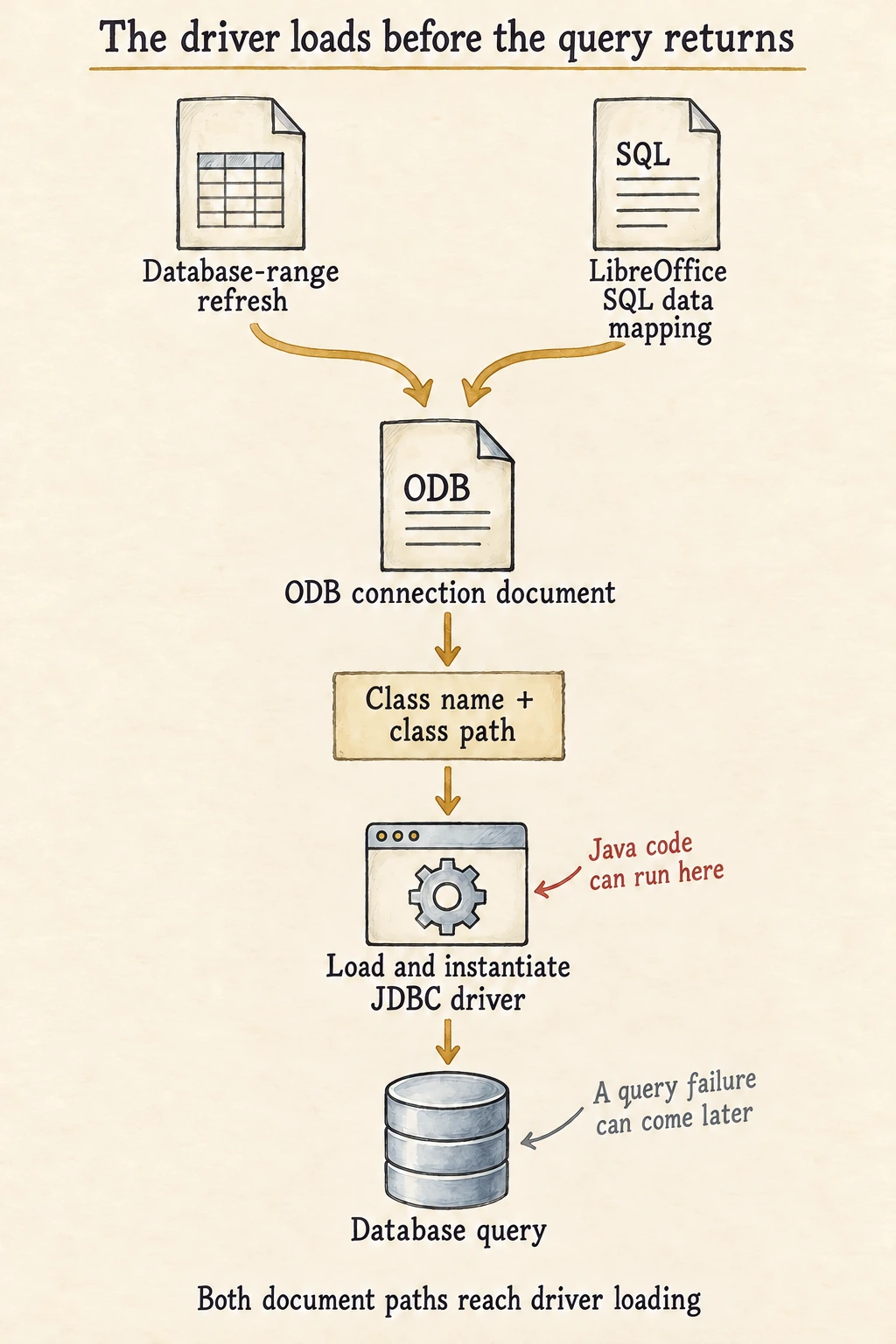
2 The driver exists before the query returns
The database document's db:java-driver-class names a Java class, and db:java-classpath supplies its location. LibreOffice's database XML importer converts these into connection properties, including JavaDriverClassPath. The office application's JDBC connection wrapper accepts that configuration through java_sql_Driver::connect(), creating a wrapper object. Its java_sql_Connection::construct() reads the class name and path and calls loadDriverFromProperties() to prepare the actual Java driver. A database connection has yet to be obtained.
The next step handles a code location. In JConnection.cxx, lines 118–241, loadClass() translates the class path into a Java URL array, uses it to construct java.net.URLClassLoader, and loads the named class. The old ClassPath::translateToUrls() splits class-path entries and expands internal URL variables without restricting their scheme before creating the URLs. HTTP and HTTPS locations can consequently become sources of driver code.
After finding the class, loadDriverFromProperties() invokes newInstanceObject() at line 650. This creates a driver object, or instance. In Class.cxx, lines 54–68, the wrapper obtains the no-argument constructor through JNI's GetMethodID() and creates the object with NewObject(). Under the JNI specification, the first step already initializes an uninitialized class, followed by constructor execution in the second. The wrapper then calls the Java driver's own connect(), continuing towards a database connection and query. A malicious driver need not return a useful table, and a subsequent connection failure leaves earlier execution possible.
OpenOffice 4.1.16 likewise loads the class and creates a driver object before asking it to connect to the database. Its loadClass() constructs a URL class loader. loadDriverFromProperties(), line 722, creates the driver object and returns to the later steps in construct(), which invoke the Java driver's connection method. This code runs in the desktop environment opening the document, with access constrained by that operating-system user's permissions and additional isolation.
The path needs a usable Java runtime and JDBC functionality. V12 reports verification with LibreOffice 26.2.4.2 on Windows and 24.2.7.2 on Ubuntu, and with OpenOffice 4.1.16 on Linux and Windows. Windows OpenOffice is a 32-bit application and needs a compatible 32-bit JRE. An installation missing those components can stop earlier.
3 Two document features reach the same driver loader
LibreOffice's advisory names the SQL provider in calcext:data-mappings, which takes a different initial path from a database-range refresh. Before the fix, ScXMLMappingContext restores the document-selected provider and immediately refreshes it when import finishes. The provider factory can create a SQLDataProvider from that setting.
In SQLFetchThread::execute(), the provider separates a table name from a database name, calls DatabaseContext::getByName(), connects and executes a query. It joins the earlier chain at the database context, after which it can still load the JDBC driver named by an ODB. One entry comes from refreshing a database range, the other from importing an extension data mapping. These are different XML features.
The fixes operate at different points too. LibreOffice 26.2.5.2's mapping importer restores only CSV, HTML and XML providers. It excludes SQL and removes the immediate refresh at the end of import. An independent check also appears downstream in driver loading. In classpath.cxx, lines 79–87, the code parses the expanded URL and requires a file scheme, throwing an exception otherwise.
// LibreOffice 26.2.5.2, key check in classpath.cxx
if (!uriRef.is() || !uriRef->getScheme().equalsIgnoreAsciiCase("file"))
{
    throw css::lang::IllegalArgumentException(
        "non-local Java class path entry: " + url,
        css::uno::Reference< css::uno::XInterface >(), 0);
}
The check follows URL expansion, restricting the address ultimately passed to Java. “Expansion” here substitutes internal variables in a URL, a separate feature from Office macro scripts. Restricting HTTP, HTTPS and other driver sources leaves JDBC available for legitimate drivers installed in advance and found through allowed class paths.
Apache published two changes. The first queries a document's XLinkAuthorizer before DoImport() handles a URL data source. Import stops when that interface exists and refuses authorization. The second checks class paths, allowing file:, jrt:, jmod: and jar: URLs wrapping those three schemes. Other entries are logged and skipped. LibreOffice rejects non-file schemes with an exception, while OpenOffice uses these allowed prefixes and skips rejected entries.
A JAR is an archive containing Java classes. An outer jar: scheme identifies the archive wrapper, with the archive's own location nested inside. V12 uses a remote class path in the jar:http: form. In a harmless example, jar:https://example.invalid/driver.jar!/ still obtains the archive over the network, so both new policies exclude it. Both accept the scheme of file:///drivers/example.jar, while only Apache's prefix list accepts jar:file:///drivers/example.jar!/. SOSEC's string-model controls cover these forms, case handling and expanded addresses, with results matching the source policies. They check the scheme decision without running Java URL parsing, class loading or a full Office product. The execution results described earlier come from V12's published verification.
4 One product has an update, the other needs Java disabled
LibreOffice first fixed this in 26.2.5 and 26.8.0. The 26.2.5 announcement records its release on July 23, before the October 5 advisory. At this article's October 13 check, the official current download is 26.8.1. Use the complete stable package. For Linux packages maintained by a distribution, check that distributor's repair record because its package may contain a backport.
OpenOffice's stable download page still offers 4.1.16, while Apache's advisory still describes 4.1.17 as a release candidate. Fixed source is available, but the stable package remains in the affected range. Disable Java while waiting for the stable repair.
In OpenOffice, open Tools → Options → OpenOffice → Java and clear “Use a Java runtime environment”. On macOS, enter the corresponding page through OpenOffice Preferences. Apache's alternative, when Java cannot be disabled, is to avoid opening untrusted files. LibreOffice's Java switch lives in LibreOffice → Advanced, which also helps identify desktops with a runtime enabled. Disabling Java affects workflows relying on JDBC or other Java components. Check that cost with legitimate database connections and restart the application to confirm the setting takes effect. If an upgrade causes compatibility problems, keep Java disabled or retain the restriction on untrusted documents. LibreOffice can use a business-tested stable build in a fixed branch, with historical floors of 26.2.5 and 26.8.0. Returning to OpenOffice 4.1.16 before its stable repair arrives still needs the temporary restriction.
5 A connection error leaves a question about earlier loading
After updating, confirm the installation directory and build that opens documents, then check a legitimate import. A desktop needing JDBC should still support a known driver at an allowed location, while an isolated test should confirm rejection of a disallowed remote class path. Identify where rejection happens to distinguish an effective source check from a later connection failure after the driver has run.
If an old installation has opened a suspicious file, preserve the spreadsheet, its referenced ODB, driver addresses, and process and network records from the opening period. Access to an ODB shows one step of the chain. Retrieving a JAR alone does not establish that the driver was instantiated. Evidence of Java execution or unusual child processes warrants recovery based on the files, sessions and credentials available to the office application's user. Preserve the original document and telemetry before opening it again to see whether the error returns.